Twitch Streaming Recorder


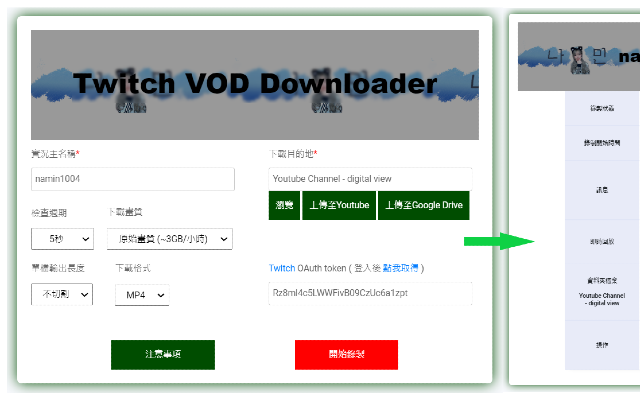
In the rapidly evolving landscape of digital media, live streaming has become a cornerstone of global entertainment. Twitch, the leading platform for gamers and creative broadcasters, hosts millions of hours of content every day. However, the ephemeral nature of live streams often leaves viewers wishing they could preserve moments for eternity. Enter the Twitch Streaming Recorder, a sophisticated Chrome extension designed to bridge the gap between live broadcast and permanent storage.
Overview: Why Record Twitch?
In recent years, the landscape of live stream archiving has shifted from inconvenient to downright restrictive. Look no further than South Korea for the ultimate cautionary tale: due to astronomical domestic network usage fees, Twitch completely banned and deleted VODs, clips, and rewinds for Korean users, before eventually shutting down its entire South Korean operations altogether.
This extreme shift proved a harsh reality to the global community: there is no longer a reliable, built-in way to guarantee your favorite broadcasts will be saved forever.
Even outside of complete regional shutdowns, everyday viewers face a frustrating uphill battle. Twitch routinely deletes past broadcasts after 7 to 60 days, and the constant threat of sudden DMCA takedowns means a legendary, history-making stream could vanish into the ether at any moment. If you aren’t recording the stream while it happens, you risk losing it forever.
This is exactly where the Twitch Streaming Recorder Chrome extension steps in…
Core Features and Functionality
This extension isn’t just a simple capture tool; it is a comprehensive multimedia management suite for Twitch enthusiasts. Below, we dive deep into the technical and practical features that set this tool apart.
- Automated Live Streaming Recording: The standout feature is the ability to automatically detect when a stream starts. By utilizing advanced JavaScript event listeners and Twitch API hooks, the extension can begin the capture process the moment the “Live” indicator appears, ensuring you never miss the start of a broadcast.
- Auto-Collect Channel Rewards: Engagement is key on Twitch, but manually clicking “Claim” on channel points can be a distraction. The extension automates this process, collecting rewards in the background while the recording runs.
- Real-time Stream Editing: Need just a 30-second clip? The built-in editing tool allows users to trim segments of the live feed on the fly, creating short-form content perfect for social media sharing.
- High-Resolution Screenshots: Capture high-quality frames from the stream with a single click, perfect for thumbnails or reaction posts.
Cloud Integration and Storage Solutions
One of the biggest challenges with high-quality video recording is storage space. The Twitch Streaming Recorder addresses this by offering flexible storage paths:
- Local Storage: Save raw files directly to your hard drive in optimized formats.
- Google Drive: Sync your recordings to the cloud automatically, allowing for easy access across multiple devices.
- YouTube Integration: Streamline your workflow by uploading recorded sessions directly to your YouTube channel as unlisted or public videos.
Conclusion
The Twitch Streaming Recorder represents a significant leap forward for browser extensions. By combining the power of local processing with the convenience of cloud storage, it offers a professional-grade solution for a global audience. Whether you’re a casual viewer or a dedicated archivist, this extension empowers you to take control of the content you love.